

Clean your lens: phone photo and video tips for busy business owners
You don’t need new gear to post better photos and videos. Five phone settings and habits, plus how to plan a month of content in 20 minutes.
The Big Idea
Over the weekend I ran a social media workshop for SingUnited Aotearoa New Zealand (formerly Sweet Adelines New Zealand), with volunteer social media reps from barbershop choruses around the country. I’ve been singing with Christchurch City Chorus for nearly 22 years, so this one was close to my heart.
What struck me is how much those reps have in common with small business owners. They’re busy. They wear several hats. They post when they have time in between their busy lives, or when they have content they think is worth posting. They do it on their own phone, with no budget. Most weeks they open Facebook, stare at the screen and think, "What on earth do I post today?"
If that sounds familiar, here’s the good news. You don’t need to buy anything. The phone in your pocket is more than enough. What makes the difference is a few settings, a few habits and a plan.
And if you only take one thing from this blog, make it this: clean your lens.

Wipe it again every time it comes out of your pocket.
Try This Week: five minutes with your phone
- Clean every lens. Give all of them a wipe, including the front camera, even with your shirt if that’s all you have handy. If lights in your shots have weird flares coming off them, your lens is dirty. Wipe it again every time it comes out of your pocket.
- Turn on the grid. It’s in your camera settings. It helps you hold the phone straight, and the four spots where the lines cross are where the eye likes to land. Put your subject on one of those, not bang in the middle.
- Fix the flicker. Our lights run at 50 hertz, but most phones come set up for American lights, so videos flicker. On an iPhone, go to Settings, Camera, Record Video, turn on PAL formats and choose 25 frames per second, in 1080p or 4K. On a Samsung, use Pro Video and set the shutter speed to 1/50. Heading to the US? Switch back to 30.
- Stop pinching to zoom. Pinch zoom is digital and loses quality. Use the lens buttons instead (0.5x, 1x, 2x and so on), which switch to a real lens.
- Shoot it both ways. Take one vertical, for reels and stories, and one horizontal, for your website, YouTube and print. Future you will thank you.
Want to make life easier still? A phone tripod costs a few dollars, and a small wireless clip-on mic makes a huge difference outdoors. Good audio makes a video perform better, even when the picture isn’t perfect.
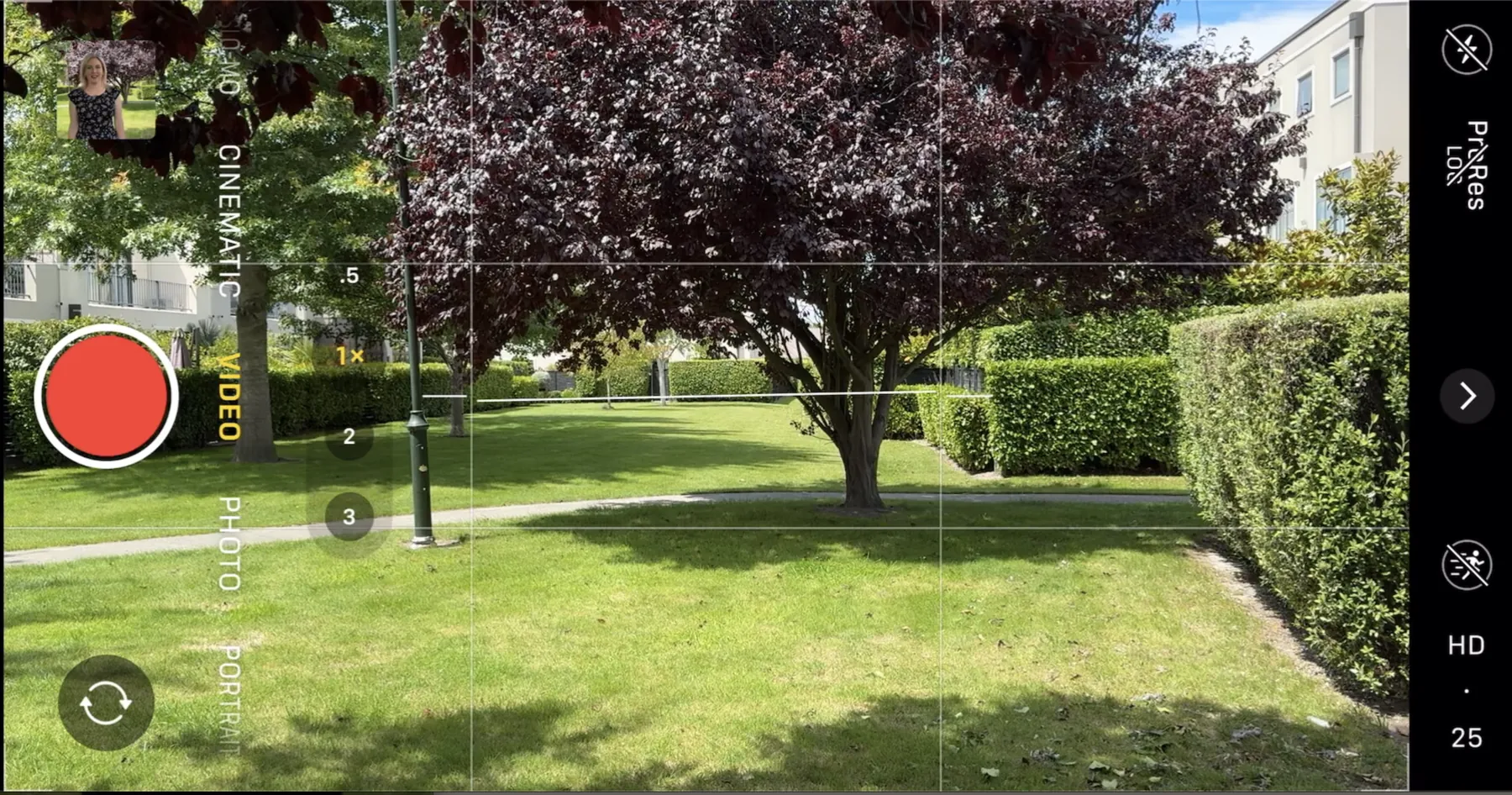
Put your subject where the lines cross, not bang in the middle.
Plan your month in 20 minutes
The hardest part of social media isn’t taking photos. It’s knowing what to post. That’s where content pillars come in.
Pillars are a handful of themes that belong to your business. They give you a direction, so you’re never starting from a blank screen.
Pair them with 20 minutes of planning once a month, with your calendar and a cuppa, and most of your month is sorted before it starts.
Choose pillars that match your capacity, not your ambition.

You don’t own your social media presence.
What’s Moving: you don’t own your social media
Meta is rolling out limits on links for Facebook business pages, including here in New Zealand. Pages get two free links a month across posts and comments, so putting the link in the first comment doesn’t get around it. More links mean a paid Meta One plan, from about $88 a month for eight links up to about $883 a month for unlimited. The website link on your Page isn’t affected, and nor are your ads.
It’s a good reminder that you don’t own your social media presence. The platforms can change the rules overnight. The only place you truly own is your website, so make it the home for everything that matters, and use social media to send people there.

Ask Elizabeth
Can I use AI to write my social media captions?
Yes, and it can save you heaps of time. But AI has never met your business, so you have to teach it who you are. If you just type "write me a caption", you’ll get something generic.
The more context you give it, the better it gets. Tell it who you are, what happened and how you like to sound.
Then ask it to interview you before it writes anything. That one line makes a huge difference.
And check every fact it gives you, because AI likes to invent statistics.
One more thing. Check your privacy settings so what you type isn’t used to train the AI, and you aren’t giving away your company’s IP.
Want to know if AI tools would recommend your business? Our free guide, Will ChatGPT recommend your business?, has a 5 minute self-check and seven fixes in priority order.
Sources: B2B News, "Meta One: Facebook link caps cost NZ firms up to $883 a month", 21 October 2026 · NewsWire, "Facebook link limit hits New Zealand business pages", 22 October 2026
Want the full method for you or your team?
Our bespoke marketing coaching is one to one, in person or online, and covers photography, phone video, content planning and AI for business.
See coaching options